

Phacet vs Excel for supplier invoice control at scale
Published on :
September 7, 2026

Nicolas Marchais is co-founder and CEO of Phacet. After seven years at Spendesk, he built Phacet as the agentic layer that orchestrates across ERP, banking and email systems. Reliable, auditable, cross-system, what he calls a Finance Workforce.

This article is for the CFO, controller or AP accountant of a 50 to 500 employee company running several sites or entities, who controls supplier invoices in Excel today and has just watched the workbook miss something. If you are looking for an invoice template to bill your own clients, this is not the page.
Excel invoice management works for tracking supplier invoices: number, due date, status, amount. It stops working for controlling them once volume forces you to sample, because a spreadsheet does not compare every line to the negotiated price, the purchase order and the delivery note, and keeps no audit trail you could hand to an auditor. A Phacet agent runs those checks on 100% of invoices, in an interface that still looks like a table, for 20 credits per invoice.
Last verified: 5 September 2026. Pricing and the Microsoft documentation cited below were checked on that date and may change.
Key takeaways
- At Astotel (18 hotels), supplier price control on Excel and PDFs let through up to €400 of billing errors per month on a single supplier, close to €5,000 a year.
- Across the 11 top-20 Google pages analysed on 5 September 2026 for "excel invoice management" and its French equivalent, none mentions purchase orders, three-way matching or a supplier price list: these guides cover tracking, not control.
- Excel's own change history (Show Changes) keeps edits for up to 365 days and only in Excel for Microsoft 365, which is not an audit trail for supplier payments.
- A Phacet agent extracts and controls one supplier invoice for 20 credits: about 1,500 invoices a month on the €299 Studio plan, 4,000 on Studio Max.
- Phacet does not replace the table: its AI Tables keep the spreadsheet interface and add per-line rules, three-way matching and a native audit trail.
When should you use Excel to track supplier invoices?
A supplier invoice tracker in Excel takes an hour to build and earns its keep for years. One row per invoice, a dozen columns: vendor, invoice number, issue date, due date, net amount, tax, gross amount, status (received, approved, paid, disputed), payment date, notes. Conditional formatting colours overdue lines, a filter isolates one vendor, a pivot table gives the amount committed per month or per site. For a company that receives a few dozen invoices a month, it is a good tool, and nobody should apologise for it.
The workbook does three things well. It shows what is owed and when. It gives finance and management a shared view, as long as the file is current. And it needs no training: everyone can open a table. That last point matters enough that Phacet kept it. Romain Joussellin of the accounting firm CPA puts it plainly in his case study: "Phacet feels like an Excel table powered by AI." So the debate is not table versus no table. It is about what the table verifies.
Because tracking is not control. Tracking is knowing that a €4,812 invoice from vendor X is due on the 30th. Control is knowing whether the €4,812 is right: whether the price per kilo is the one on the negotiated price list, whether the quantities match the delivery note, whether this invoice was already paid under another number, whether the bank details are the vendor's. The tracker holds none of that. It holds whatever someone retyped from the PDF.
Why don't spreadsheets scale for accounts payable?
The first reason is not a broken formula, it is a blind spot in the method. We read the eleven editorial pages ranking in Google's top 20 on 5 September 2026 for "excel invoice management" and its French equivalent: guides, downloadable templates, tutorials. The terms "supplier", "purchase order" and "three-way match" appear zero times across the five English pages; "bon de commande", "rapprochement" and "mercuriale" (the French word for a negotiated price list) appear zero times across the six French ones. Nine of the eleven pages use the word "client" or "customer" and only five use "supplier", "vendor" or "fournisseur": most are actually about invoices you send out. In other words, what you are taught to do in Excel is tracking. Control is not on the syllabus.
The second reason is the one Valérie, Purchasing Director at Astotel, a group of 18 Paris hotels, describes in a case study updated on 2 May 2026: "Before Phacet, everything was done manually, using Excel spreadsheets or PDFs, which made comparisons very difficult." Then, once every line was compared: "For the same reference of smoked salmon and the same quantity, I found up to a €6 difference per kilo between two hotels." The workbook existed. The negotiated prices existed. What did not exist was the line-by-line comparison between the two, because it requires retyping every line of every invoice.
How do you keep version control on a shared invoice spreadsheet?
You mostly don't. Excel for Microsoft 365 lets several people co-author a workbook, and its Show Changes feature records who changed which cell and when. But as soon as sites keep their own copies, someone exports a version to email it, or a macro breaks after an update, the "one source of truth" splits into several. The usual answer is a naming convention and a person who consolidates on Friday. That person is doing reconciliation work by hand, on data that was already retyped once.
The table below lists the seven checks a supplier invoice should pass before approval, and what a workbook can realistically do for each.
| The check | In an Excel workbook | With the Phacet agent |
|---|---|---|
| Vendor identity (registration number, VAT ID, legal name) | Typed in by hand, no external verification | ✓ Automatic web enrichment (company registry, VAT, officers) in a dedicated column |
| Bank details and IBAN | Eyeballed against the archived bank letter, if anyone remembers | ✓ Alert on any IBAN that differs from the vendor reference |
| Duplicate | Search on the invoice number in this year's workbook | ✓ Matched on number, amount, date and description across the full history |
| Purchase order and delivery note | Three files, three formats, one fragile VLOOKUP | ✓ Three-way matching by reference and quantity, every mismatch flagged with its reason |
| Invoiced price versus negotiated price list or contract terms | Impossible without retyping every line of every invoice | ✓ Every line extracted from the PDF and compared to the vendor's price list, per site |
| Approval thresholds | An "approved by" column filled in after the fact | ✓ Routed to the right approver by your thresholds, decision logged |
| Mandatory mentions and tax | Visual check of the PDF | ✓ Fields and rates extracted, anomalies raised before posting |
Recorded on 5 September 2026 from the documentation of Phacet's agents (supplier billing control, validation before payment, three-way matching). The Excel column describes how a tracking workbook is used in practice, not the theoretical limits of the software.
No row in this table blames Excel. A spreadsheet never promised to read a PDF, query a company registry or remember an invoice paid fourteen months ago. The problem appears when it is asked to play that role at a scale where nobody re-reads anymore.
At how many invoices a month does the spreadsheet stop being a control?
The limit is not technical. A worksheet accepts 1,048,576 rows by 16,384 columns according to Microsoft's published specifications; no mid-sized company will get near that with supplier invoices. The limit is human: it arrives the day line-by-line checking becomes impossible and the team switches, often without saying so, to sampling. You check the large invoices, the new vendors, one month in three. The rest is entered and paid.
That day comes sooner than expected. At La Nouvelle Garde, a group of ten Paris brasseries, "reconciliation between delivery notes and invoices were done only by sampling," says the case study published on Phacet's site. Its CFO, Théo Richard, prices the method: "A ten-cent difference on a delivery note, at our volumes, can mean half a margin point lost." At Astotel, a single supplier put through systematic control represented "up to €400 in errors per month, or nearly €5,000 annually." Sampling does not reduce the error; it reduces the odds of seeing it.
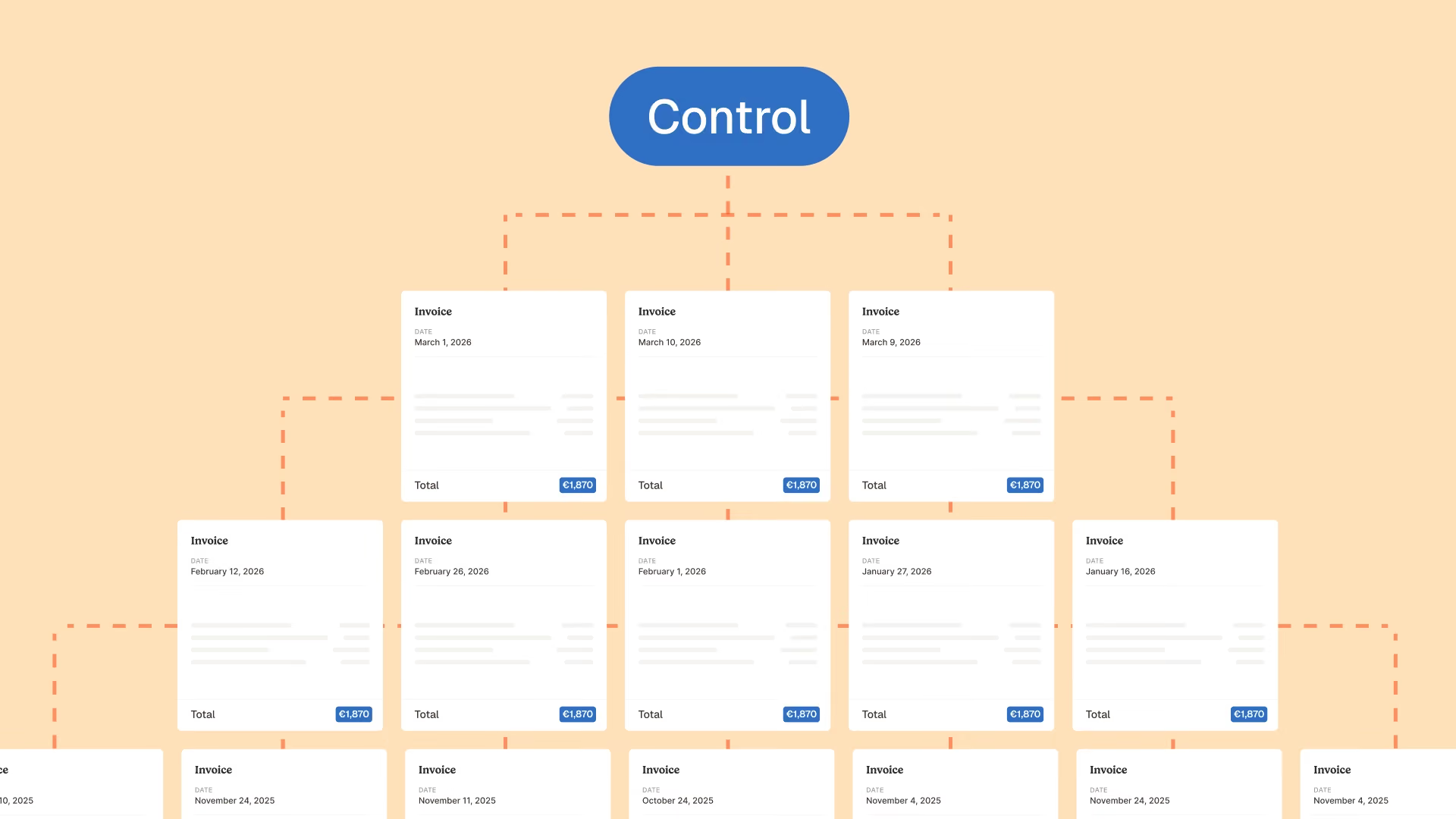
So the practical threshold is read in your organisation, not in an Excel row count: as soon as a vendor delivers several times a week at negotiated prices, as soon as the same product is bought by several sites, as soon as the workbook is shared between people who do not open the same version, sampling has become the rule. A workbook does not move a team from a sample to 100% of lines. That is exactly the job of the Control supplier billing and reduce overpayments agent: it reads every invoice, compares every line to the negotiated price and raises every discrepancy with its reason, before payment.
What does a Phacet agent do that the workbook cannot?
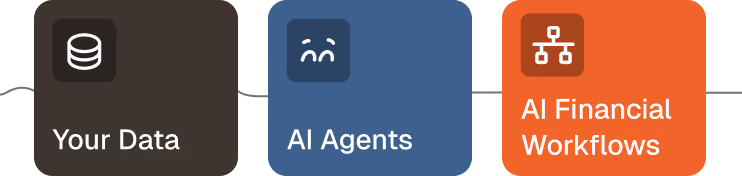
A Phacet agent is an AI agent, a specialised program that performs one precise piece of finance work, here supplier invoice control, on your data, with your rules, and shows its reasoning at every step. It fits in three verbs.
Structure. The agent reads invoices where they land: mailbox, e-invoicing platform, SFTP, ERP export, scanned PDF. It extracts every line, reference, quantity, unit price, tax, IBAN, and lays them out in a Table. Phacet's product page describes these Tables as "not an improved spreadsheet, a database with configurable AI columns", a database that keeps the spreadsheet interface. The retyping that Romain Joussellin calls "inhuman" when a restaurant invoice has "5 lines or 50" disappears. The sources listed on the same page are the ones your team already uses: Sage, Pennylane, NetSuite, Xero, QuickBooks, Gmail, Outlook, SFTP, CSV, PDF and Excel itself.
Match. Once the lines are structured, the agent applies your rules to each of them: negotiated price per vendor and per site, purchase order, delivery note, thresholds, reference IBAN, payment history. Its documentation states the goal in one line: move "from occasional sampling to 100% invoice checks", with "no VLOOKUP, no manual comparison." Every discrepancy is flagged with the exact reason: not "anomaly", but "invoiced at €14.90 against €12.50 on the 1 March price list".
Analyze. What comes out of the agent is not a report, it is a list of exceptions to handle: compliant invoices go to payment, the others reach the right person with the source document attached. The team no longer re-reads everything; it decides on what deserves a decision. Julien Fissette, CPO of Roundtable, sums up the experience: "Phacet is like having ChatGPT in Excel, with the same experience as Notion."
The table below compares the two approaches on eight criteria, as they stood on 5 September 2026.
| Criterion | Excel tracking workbook | Phacet control agent |
|---|---|---|
| Invoice coverage | Whatever the team has time to re-read, in practice a sample | ✓ 100% of invoices, 100% of lines |
| Reading documents | ✗ Manual retyping from the PDF or email | ✓ Automatic extraction from email, PDF, scan, ERP, SFTP |
| Negotiated price list | A tab maintained by hand, rarely current | ✓ Price list per vendor and per site, compared to every line |
| Purchase order and delivery note | Formula-based matching, if all three files exist | ✓ Native three-way matching, mismatch explained |
| Duplicates | In the open workbook, by number | ✓ Across the full history, by number, amount, date and description |
| Audit trail | Change history for up to 365 days in Excel for Microsoft 365, with no link to the source document | ✓ Every value linked to the passage of the PDF it came from, every decision timestamped |
| Multi-site work | One copy per site, manual consolidation | ✓ One Table, rules per site, exceptions routed to the right person |
| Cost per controlled invoice | Entry and re-reading time, unmeasured | 20 credits per invoice extracted and controlled, 30 for the price list comparison |
Sources: support.microsoft.com (Excel specifications and limits, Show Changes), phacetlabs.com (Structure page, supplier billing control agent, pricing), checked on 5 September 2026.
What the eight rows have in common: the agent does not replace the team, it replaces the re-reading. The decision on a discrepancy stays human, and it is the Structure pillar of the platform that makes that decision possible, because the data is reliable before it is controlled.
Audit trail: what Excel keeps and what the agent keeps
An audit trail is the record of who changed what, when, and from which source, so that a decision can be reconstructed afterwards. Excel has one, and it is limited. The Show Changes feature, as documented by Microsoft, shows "who changed what, where, and when" and lets you "see past changes for up to 365 days", in Excel for Microsoft 365 only. It tells you a cell went from 12.50 to 14.90. It does not tell you where the 14.90 came from, or why it was accepted.
For an auditor, or for a CFO taking over a file, that difference is the whole difference. Guillaume Morin, CFO of Le Wagon, describes his trial of generalist tools before Phacet: "I had tested generalist solutions, but I couldn't audit the data or trace the calculations that led to the final result." And his conclusion: "Phacet is the anti-black box." In a Phacet Table, every extracted value is linked to the passage of the document it came from, highlighted on the PDF, and every check and every human validation is timestamped. You do not reconstruct the decision: you re-read it.
What does moving from Excel to an agent cost?
Excel is already paid for, and that is its first argument. Its real cost is measured in hours: Valérie at Astotel reports saving "at least two hours of work per day" during the test phase alone, "by eliminating tedious manual control tasks", and up to two days a month since. Two hours a day of a purchasing director across 18 hotels is the price of a sample-based control which, despite that time, let €5,000 a year slip through on one supplier.
Phacet publishes its numbers. The Studio plan starts at €299 a month with 30,000 credits and one user, Studio Max at €799 a month with 80,000 credits and three users, and the pricing page gives the cost of each action: extracting and controlling a supplier invoice costs 20 credits, comparing invoiced prices to the negotiated catalogue 30 credits, matching purchase order, delivery and invoice 30 credits. A Studio plan therefore covers about 1,500 controlled invoices a month, Studio Max about 4,000, if they do nothing else. AI costs are passed through at cost, the trial runs 14 days on your own invoices, and a first agent is in production in under two weeks.
So the honest comparison is not "free versus €299 a month". It is "hours of re-reading for a sample" versus "20 credits for 100% of lines". For a company receiving a few hundred supplier invoices a month, the second option costs less than the first from the first price discrepancy recovered.
Francis Messiaen, CFO of the Coiro group (€56 million in revenue, 250 permanent employees), sums up what moving from a workbook to an agent changes for a finance function: "The objective is to be in supervision of the process rather than in its execution." The table stays. What changes is who re-reads the lines: the agent, all of them; the team, the ones that raise a question.
Your workbook tracks your invoices. Who controls the lines?
See how the agent compares every invoice line to your negotiated prices, on 100% of invoices, with the reason for every discrepancy.
Frequently asked questions
What is the best spreadsheet to use to keep track of invoices?
Any spreadsheet works for tracking if it holds one row per invoice with vendor, number, issue and due dates, net and gross amounts, status and payment date, plus conditional formatting on overdue lines. Excel and Google Sheets both do this. No spreadsheet, however, verifies invoiced prices against a price list or matches purchase orders and delivery notes without retyping.
Can I generate invoice reports or summaries using Excel?
Yes. Pivot tables summarise invoices by vendor, month, site or status, and charts follow committed spend over time. The limit is upstream: a report is only as reliable as the lines typed into the workbook, and a tracking sheet does not know whether those lines were checked against the price agreed with the vendor.
Does Microsoft Excel have an invoice template?
Yes. Microsoft publishes free invoice and invoice tracker templates for Excel, with formulas for subtotals, tax and totals. They are built for issuing invoices to customers or logging invoices received. They do not compare a received invoice to a purchase order, a delivery note or a negotiated price, which is where supplier invoice control starts.
When to use accounting software instead of Excel?
Move tracking to accounting software as soon as several people update the same file or invoices must post to a ledger. Move control to a dedicated agent when volume forces sampling: a Phacet agent extracts every invoice line, compares it to the negotiated price, the purchase order and the payment history, and flags each discrepancy for 20 credits per invoice.

Latest Resources
Unlock your AI potential
Go further with your financial workflows — with AI built around your needs.


