Changelog
Latest features & updates.

What's new in Phacet #41
This week brings a few improvement regarding the control over your credit spend. Big announcements come next week. Here's what's new:
- Low-credit alerts per organization: Each org admin can set their own low-credit email threshold, and the top-up link in that email now opens top-up directly.
- Billing shows your plan allowance: The billing page shows the current plan's Hyperline credit allowance.
- New GPT-6 models in tables: Tables now default to gpt-6-luna and gemini-3.8-flash.
See you next week
What's new in Phacet #40
Small batch this week, we’re working on new integrations that will be released shortly. Here's what's new:
- Several same-app connections: A project can now hold more than one connection to the same app.
- Rename conversations: Ask the agent to rename the current conversation, so it's easier to find later.
- Billing: The credits page is clearer and more helpful if you want to look at your spending.
See you next week
What's new in Phacet #38
This week, we made it easier to stay in the loop with your agents, and gave you a few more ways to see what's happening under the hood. Here's what's new:
- Sound notification when the agent is done: Get an audio alert the moment a run finishes, so you don't have to keep checking the tab.
- Uploaded files shown in conversation: The conversation files dialog now lists every file you've uploaded in that thread.
- Credits consumption filter: Filter credit usage across all agents and all tables at once.
- File attachments in recap emails: Recap emails can now carry a file along with the summary.
Bug fixes
- Fewer chat glitches: Fixed duplicate messages while a reply streams in, blank gaps after a failed retry, and messages disappearing after you send them.
See you next week
What's new in Phacet #37
A few small frictions were slowing you down - in the agent, in chat, in your tables. This release clears them out. Here's what's new:
- Contextual column placement: Our agent now adds new columns where they make sense, not just at the end.
- Add row context in chat: Selecting rows in a table now carries them into your chat context automatically.
- Credit usage confirmation: The agent now asks before running an expensive table job, so you're never surprised by the cost.
- Resizable spreadsheet previews: You can now resize columns in the spreadsheet preview inside chat.
- Faster table filtering: "Contains" filters on table rows are now noticeably faster.
Thanks for being here. If something looks off, tell us—we're eager for the feedback.
What's new in Phacet #36
This week we focused on strengthening all the things we released during summer. Think of it as the cherry on the cake. Here's what's new:
- Public dashboard sharing: Share any dashboard with a public URL, no login required for viewers.
- Favorite tables and reports: Star your most-used tables and reports for one-click access from navigation.
- Team profile pictures: Your Clerk profile picture now appears everywhere your team collaborates.
- Minutely agent schedules: Schedule agents to run every minute for near-real-time automation.
- Smarter notification recipients: Choosing who gets notified by email is now easier and clearer.
- More resilient schedules: Scheduled agents keep running smoothly instead of blocking unnecessarily.
- Cleaner recap emails: Scheduled-agent recap emails read cleanly, without stray markdown symbols.
- Fork shared chats: Turn a shared read-only conversation into your own copy to edit freely.
- Shared agent knowledge base: Agents can now tap into a common knowledge base across your workspace.
- Better Excel previews: Previews now open on the first sheet that actually has data.
Thanks for being here.
What's new in Phacet #35
Whether you're topping up credits, chasing down an invoice, or chatting with our agent, this week makes the everyday parts of your workflow faster and clearer. Here's what's new:
- Custom credit top-ups: Choose your own top-up amount when adding credits to your account.
- New Security page: We've merged multi-factor authentication into one dedicated Security page in settings.
- Lists in agent chat: You can now format bullet and numbered lists directly in the agent chat input.
- Search inside PDFs: Table file previews now support searching directly inside PDF documents.
- Invoices open filtered: Clicking an invoice in a report now opens Table already filtered to it.
Thanks for being here. See you next week.
What's new in Phacet #34
The team is cooking the big batch release for September, here are a a couple of things that went out this week. Here's what's new:
- AI Match confidence scores: The agent can now see the confidence and reasoning behind AI Match results, for smarter decisions on your data.
- Download files from conversations: Any file the agent creates in a conversation can now be downloaded directly.
Thanks for being here.
What's new in Phacet #33
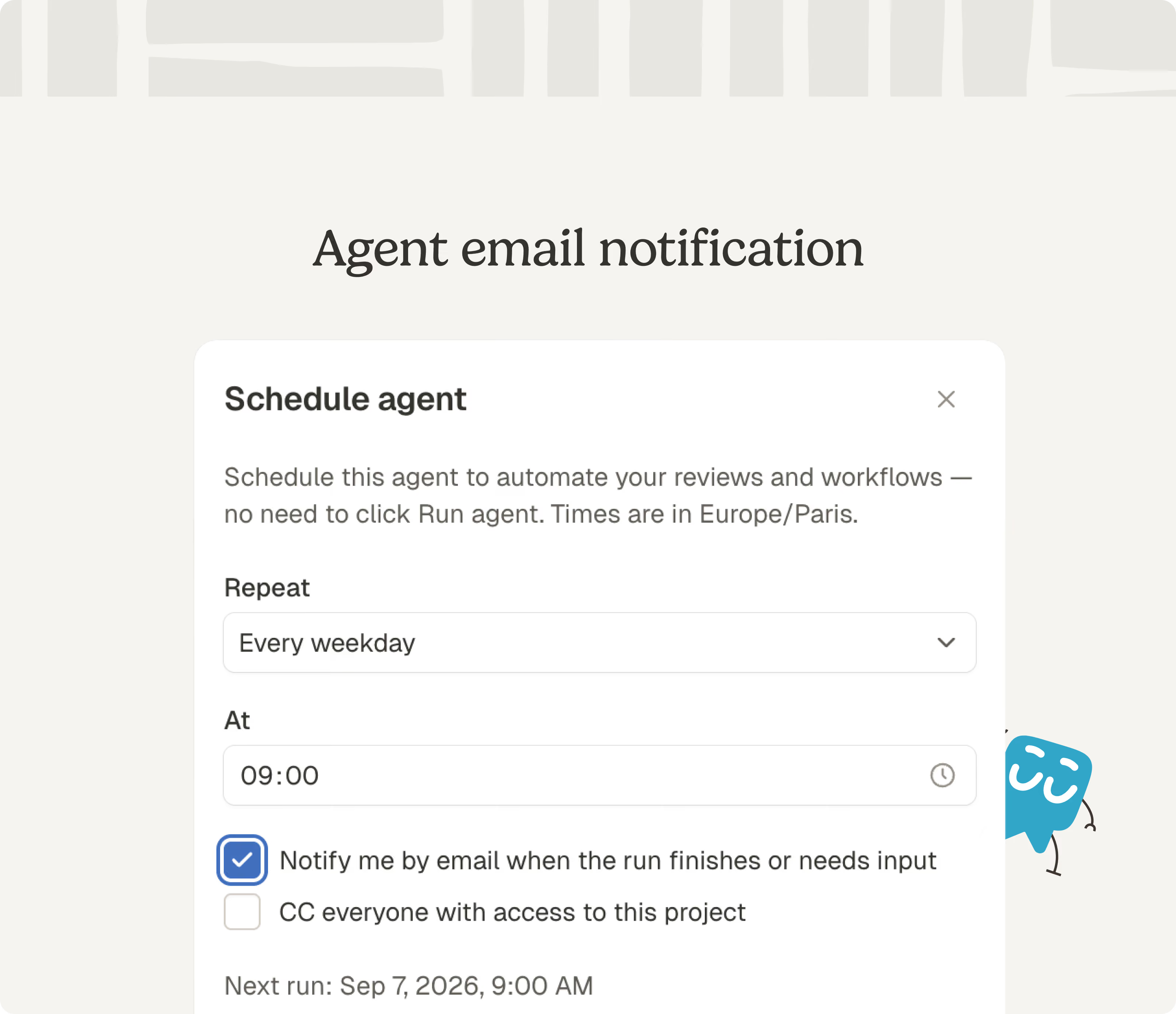
Some weeks are about shipping something new, other weeks are about making everything you already rely on feel steadier. This one was both. Here's what's new:
- Scheduled run notifications: You get a recap email as soon as a scheduled run finishes, so you don't have to check back.
- Better scanned PDF reading: Scanned PDFs now go through our agent's vision model for more accurate text extraction.
- AI Match column picker: Choose columns directly from an embedded table when matching data, this improves significantly the matching performance.
See you next week.
What's new in Phacet #32

This release significantly improves different parts of the app for everyday use. Here's what's new:
- Stop workflow, faster: Stop a running workflow right from the table. No more unwanted generation.
- New navigation: We redesigned the header to make it easier to move between pages.
- Self-serve credit top-up: You can top up your billing credits yourself, anytime.
- Resizable sidenav: Drag the home sidebar to the width that works for you.
- Message timestamps and copy: Hover any message to see when it was sent and copy it in one click.
- AI Match, multiple candidates: AI Match can now surface several possible matches instead of only one.
- Report versioning: Reports now keep track of their versions as they evolve—no need to rebuild a report from scratch.
- Responsive dashboards: Dashboards you generate now adapt cleanly to any screen size.
- Clearer error messages: Errors now show their real cause instead of a generic failure.
- Sentence-case titles: AI-generated conversation titles read more naturally.
Thanks for being here. Happy summer.
What's new in Phacet #31

This week's updates focus on making Phacet feel more dependable - dashboards that are always in sync and the ability to cancel critical actions like generating data in your table. Here's what's new:
- Faster, more reliable dashboards: Dashboards are now always in sync with your data and faster to create.
- Cancel workflows: You can now stop the generation of cells by cancelling what's being calculated in your table. No more waiting.
- Start a chat with just a file: You can now begin a conversation by uploading a file alone, even in a brand-new project.
- Smarter agent: The agent checks its answer twice before giving a factual response.
- New agent capabilities: The agent can now delete rows and reorder columns directly in your tables.
- Sharper conversation titles: Generated titles now better reflect what you actually discussed.
Thanks for being here. If something looks off, tell us.
What's new in Phacet #30
Whether you're organizing projects, building out a table, or waiting on an agent reply, this week's release smooths over the small frictions that slow you down. Here's what's new:
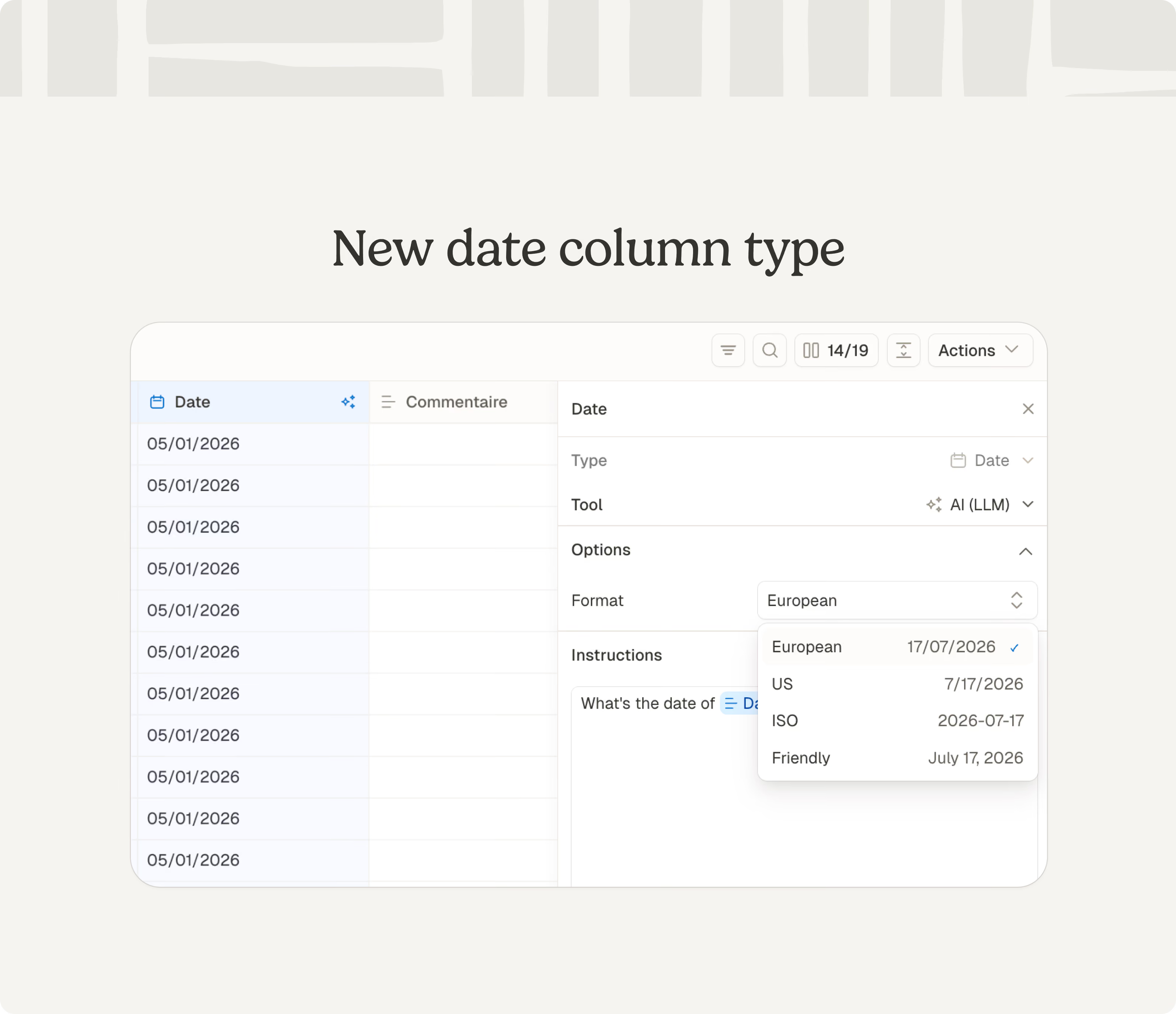
- New date column: A dedicated date format is now available in the table, so you can sort, filter, and display dates properly.
- Faster agent: We updated the agent model to make it more reliable and quicker to answer.
- Images in file columns: You can now add JPG and PNG files in the file column type - useful when you take pictures of invoices or delivery orders.
- Smarter filtering and formatting: Table search now ignores accents, currency formatting can be cleared from number columns, and column drag-and-drop is smoother.
- Project hub upgrades: Mark projects as favorites, add custom cover art, and rename or delete conversations right from the list.
- Clearer "no match" results: The agent now explains its reasoning when it can't find a match, instead of leaving you guessing.
- API key expiration control: We notify you when your API keys are about to expire, to avoid any bad surprises.
Thanks for being here. See you next week.
What's new in Phacet #29
This week's release brings your table view sharper, your agent steadier, and a few of the small frustrations you've flagged finally sorted. Here's what's new:
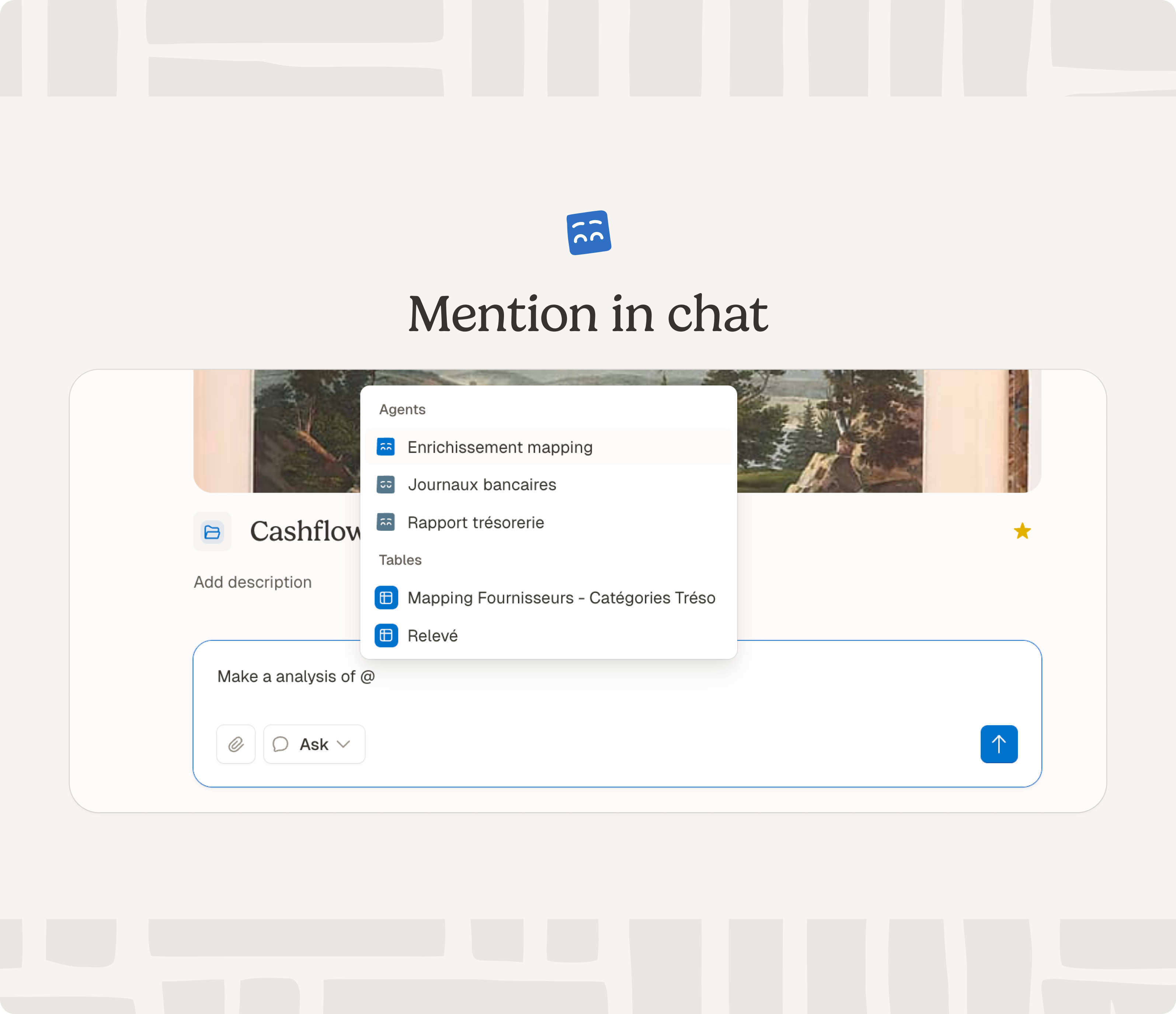
- Mentions in chat: You can now mention tables, agents, and specific columns right in a message using “@”.
- Python column explanations: Our AI now gives a clear explanation in the column using code, above the Python code it generates .
- Rename conversations from the sidebar: Edit conversation titles without opening it first.
- Cleaner table header: We removed the clutter at the top of the table and detail view
- Public API additions: Delete a row by ID, and run a row starting from a specific column, both now available.
Bug fixes
- Smarter multi-paste: Pasting into multiple cells now behaves more predictably.
- Filters stay put: Filters and row height are now remembered per table instead of bleeding into others.
- Search scoped correctly: Search results are now saved per table instead of leaking across a whole project.
- Chat display polish: Fixed overflowing text on tool calls, a double-message flash at the end of streaming, and spacing around the thinking toggle.
Thanks for being here.
What's new in Phacet #28
We've spent the last few days making the agent more resilient and performant. Here's what's new:
- Better agent autonomy: We removed the action limit that could stop the agent from finishing tasks for paying users. Your agent shouldn't stall mid-task anymore.
- Unselect all rows: Clear a multi-row selection in one click instead of clicking through each row.
- Open dashboards in full page from chat: You can now open a generated dashboard in full-page view right from its chat preview.
- Smarter dashboard creation: New dashboards now pick the right chart type for your data automatically.
- Project hub defaults to Ask mode: Chat in a project hub now opens in Ask mode by default, so it won't change your workflows by mistake.
- Faster, steadier chat: Chat loads faster and no longer flashes an empty state while catching up on a stream.
- Faster tables: We made sure tables stay responsive with larger datasets.
Bug fix
- Spreadsheet fix: Fixed a crash when the agent was reading certain xlsx files.
Thanks for being here. See you next week.
What's new in Phacet #27
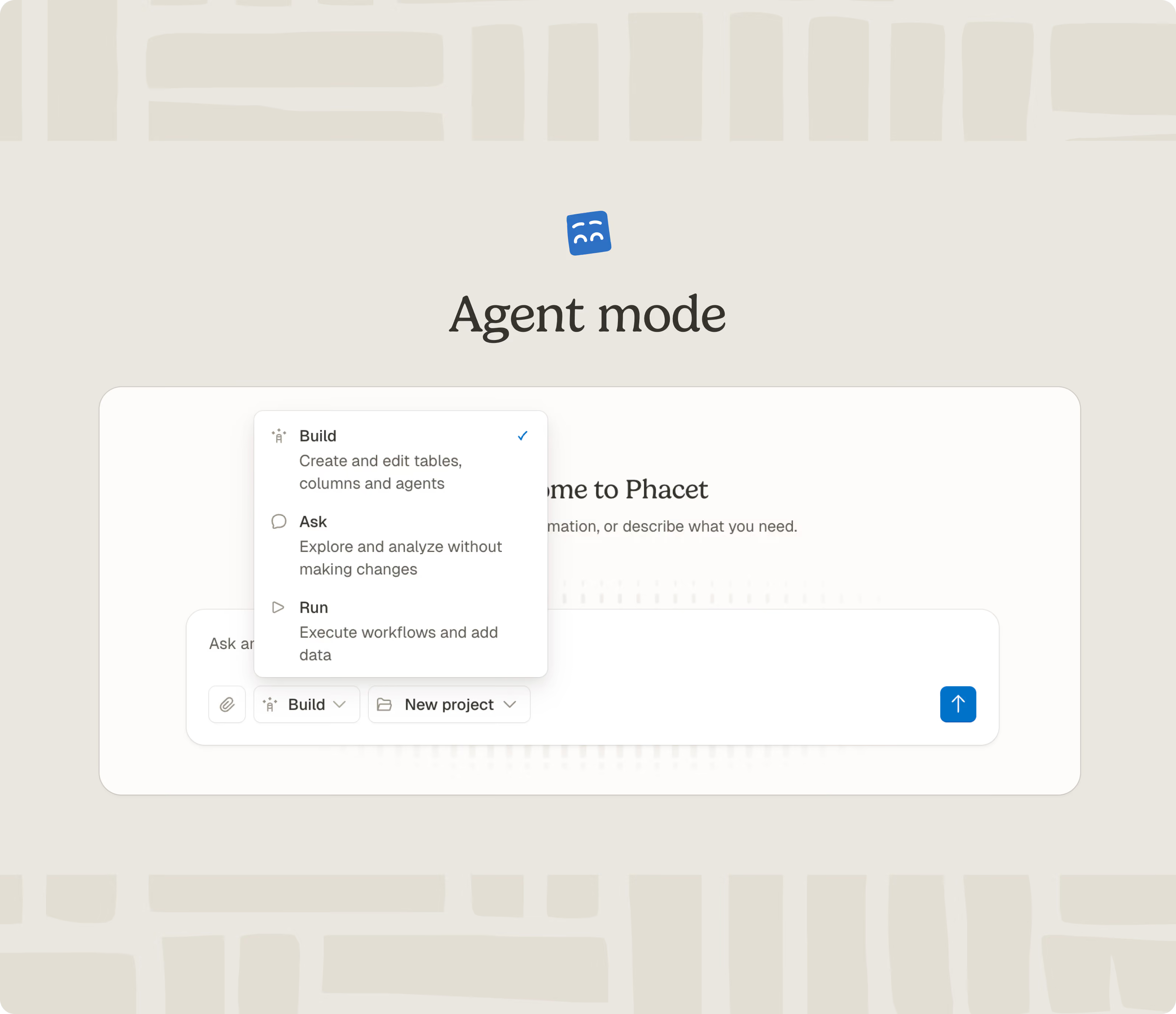
This week's release makes it easier to use the agent. Here's what's new:
- Agent mode: The agent now has a dedicated mode for building, operating, and asking questions about your data. It should be sharper and make you feel safer that it won't do something unwanted.
- Detail view refresh: The detail view has an updated layout, defaults to 150% zoom, and now displays text content in full in each cell.
See you next week.
What's new in Phacet #26
This release helps you handle more file types, keep tighter control over what your agent runs, and adds a handful of smaller improvements. Here's what's new:
- XML/UBL files: File columns now support XML-based UBL files - useful for the new FacturX standards coming along.
- Run confirmation: The agent now asks before running a table that consommes a lot of credits, so you don't spend it by accident.
- Keep your scroll position: You now keep your place in the table as you scroll and navigate.
- Delete agents: You can now remove agents you no longer need.
- Chat fixes: We cleaned up several bugs in the chat input and conversation view.
- Faster tables and agents: Row filters and agents run more efficiently, with fewer background errors.
- Faster AI cells: AI cells that handle JSON now load and respond faster.
Thanks for being here.
What's new in Phacet #25
This week we tackled the moments that used to slow you down. Think timeouts, stale pages, and a few UI rough edges that deserved better. Here's what's new:
- Table action header: Redesigned the action header above tables for a cleaner, more consistent look.
- Single and multi-select limit: You can now add up to 1,000 options per select field, up from 100.
- App startup speed: The app opens noticeably faster, especially on your first load of the day.
- Workflow cancellation: Cancelling a workflow now correctly reset pending cells instead of leaving them stuck.
- French translations: Filled in missing French UI text across multiple screens.
- Agent responses: Fixed a bug that caused the agent to stop mid-answer — it now always finishes what it started.
- Large Excel files: Big spreadsheets no longer stall or fail halfway through — Phacet handles them reliably now.
Thanks for being here.
What's new in Phacet #24
When your work depends on reliable data and responsive tools, small fixes add up fast. Here's what's new for this week:
- XML support in chat: You can now upload XML files directly in conversations.
- Exact-match latest session option: The "latest session" choice is back in column configuration.
- Agent versioning: changes to your agent are saved. Go back to an earlier version anytime.
- Credits and low balance email: Credits populate from your subscription plan, and you'll get an email when you're down to 10%.
Thanks for being here. See you next week
What's new in Phacet #23
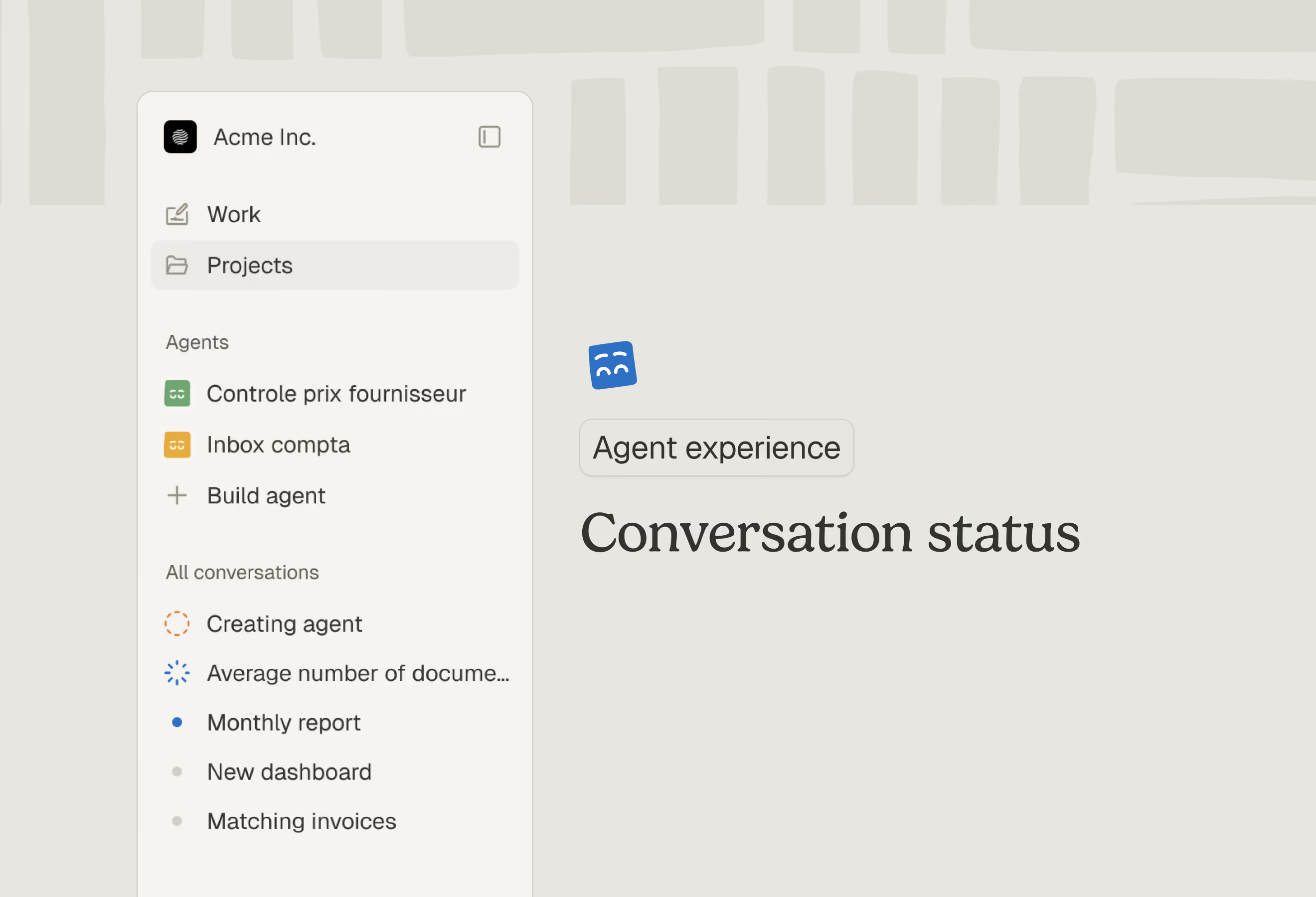
Following our biggest release, we doubled down on making the chat and the agent easier to track. You can now keep up with what's happening more easily.
- Agent detail view with run history: A dedicated view shows each agent's past runs, making debugging and review straightforward.
- Conversation files centralized: You can now find all files attached to a conversation in one place.
- Command palette: Press a shortcut to jump between agents, projects, and actions quickly.
- Credit usage dashboard: See how you're using credits at a glance, so budgeting stays simple.
- Phacet incarnation is back: Our iconic Phacet face is visible in the chat again.
- User message cropping: Lengthy user messages in chat are now cropped for readability — expand them when you need the full text.
- Table loading optimization: Sorting or filtering no longer queries the entire table, so big tables respond faster.
Bug fixes
- Bulk cell update fix: Batch updates to cells now complete reliably.
There's so much more underway. See you next week for the next announcements.
What's new in Phacet #22
May is behind us - public holidays and all. Fewer working days, more work shipped: Phacet 3.0 is out. We're heading toward an agentic Phacet, where you describe what you need and the agent executes. The next releases will strengthen the agent's capabilities, always under your control.
Agent-first experience
Phacet's new entry point. Agents move from a hidden capability to the center of how you work.
- Agent page: Agents now have their own pages, making them easier to use and edit.
- Agents in navigation: Quick access to your agents from the side navigation.
- Build agent page: A dedicated space for creating and configuring new agents.
- Agent indicators: Visual progress indicators show when agents are working in table view.
- Chat history in navigation: All your conversations now live in the side navigation, paginated and easy to scroll through.
- Conversation timestamps: Exact dates now appear next to each conversation.
Projects and Tables got an upgrade
Faster, cleaner, and easier to share.
- Projects page redesign: The projects page has a fresh layout that makes finding and managing work faster.
- Projects list page: We refreshed the look of the projects list.
- AI Match: A new matching engine that surfaces relevant connections across your data. Results display directly in cells with clear confidence indicators.
- New table performance: Tables feel noticeably faster and smoother.
- Reports page: All the files you've shared with a project, in one place. From Excel to PowerPoint, the possibilities are (almost) infinite.
- Dashboard: A new dashboard agentic skill can give you a clearer view of what's happening across your projects, based on your needs.
- Invite new users directly from a project: You no longer need to invite a user before sharing a project.
Daily improvements
- ZIP file uploads: Upload ZIP files directly in chat — useful for bulk file processing.
- Emoji picker for project icons: Customize your project icons with emojis from the sidebar.
- Auto-generate workflow description: Workflows now get descriptions automatically when created — less manual setup.
- Decimal precision for number type: Numbers now support up to 12 decimal places for precise calculations.
- XLSX/CSV file preview in chat: Preview spreadsheet files directly on the chat page.
- Chat panel resizes dynamically: The chat panel now smoothly adjusts as you resize your canvas.
- Stop button works reliably: The stop button now properly halts streams and survives page refresh.
- Agent restart on error: Agents automatically retry on certain errors via new middleware.
We can't wait for your feedback. See you next week. We're resuming weekly updates.
What's new in Phacet #21
This week brought a few bug fixes improving agent stability. We're preparing the next version of Phacet: a lot of exciting things are in the pipeline, and we can't wait to share more at the end of the month.
See you next week.
What's new in Phacet #20
While we’re getting ready for our biggest update in a few weeks, here’s what’s new:
- The agent can run workflows: The agent can now remember and manage workflows in the table, soon unlocking new automation possibilities.
- Exports with creation date: The creation date column is now included in your exports.
Bug fixes: Several improvements to stabilize the agent when it answers you or uses files.
Thank you for being here. See you next week.
If you want, I can also adapt the tone (more formal, more playful, etc.) for the public site.
What's new in Phacet #19
This week's highlight: the agent now keeps working even when you step away. This is a first milestone toward a new experience we’ll reveal in the coming weeks. Here’s what’s new:
- Agent continues working in the background: The agent keeps working on your request even if you leave the conversation, just come back when you're ready.
- Agent loading feedback: A status message now appears while the agent starts up, so you're never left wondering if something's broken.
See you next week.
What's new in Phacet #18
This week brings small improvements and a handful of fixes that help your tables behave the way you'd expect. Here's what's new:
- "Created at" column sorting: You can now sort by creation date, making it easier to find most recent entries.
- Clearer API billing error message: When credits run low, you'll see "Insufficient credits" instead of a confusing message.
Bug fixes:
- Sticky table headers: Headers now stay properly fixed when scrolling through tables.
- Consistent file upload rules: Upload limits are now the same whether you're on the home screen or inside a project.
Thanks for being here. See you next week.
What's new in Phacet #17
Last week was our bi quarterly cool down. We cleaned things up while adding some new capabilities to our agent and its stability. Here's what's new:
- Improved AI provider resilience: We installed alternatives when external AI services are temporarily unavailable, to have fewer interruptions.
- Agent keeps working when chat is hidden: You can close the chat panel in the project to focus on your table. It won’t stop the agent from working.
- Agent analytics capability are back: The agent can now perform analytics tasks again, opening new ways to explore your data through conversation.
- Agent Excel file support: You can upload and work with ‘.xlsx” or ".xls” files directly with the agent in the chat.
- Web search tool for agent: The agent now supports web search, letting it pull in external information when helpful.
- Column reordering from footer and menu: Drag columns to reorder them directly from the table footer or context menu - a nice usability add-on.
See you next week.
What's new in Phacet #16
This week brings a new awaited capacity from our agent and a few quality-of-life improvements you'll notice right away. Here's what's new:
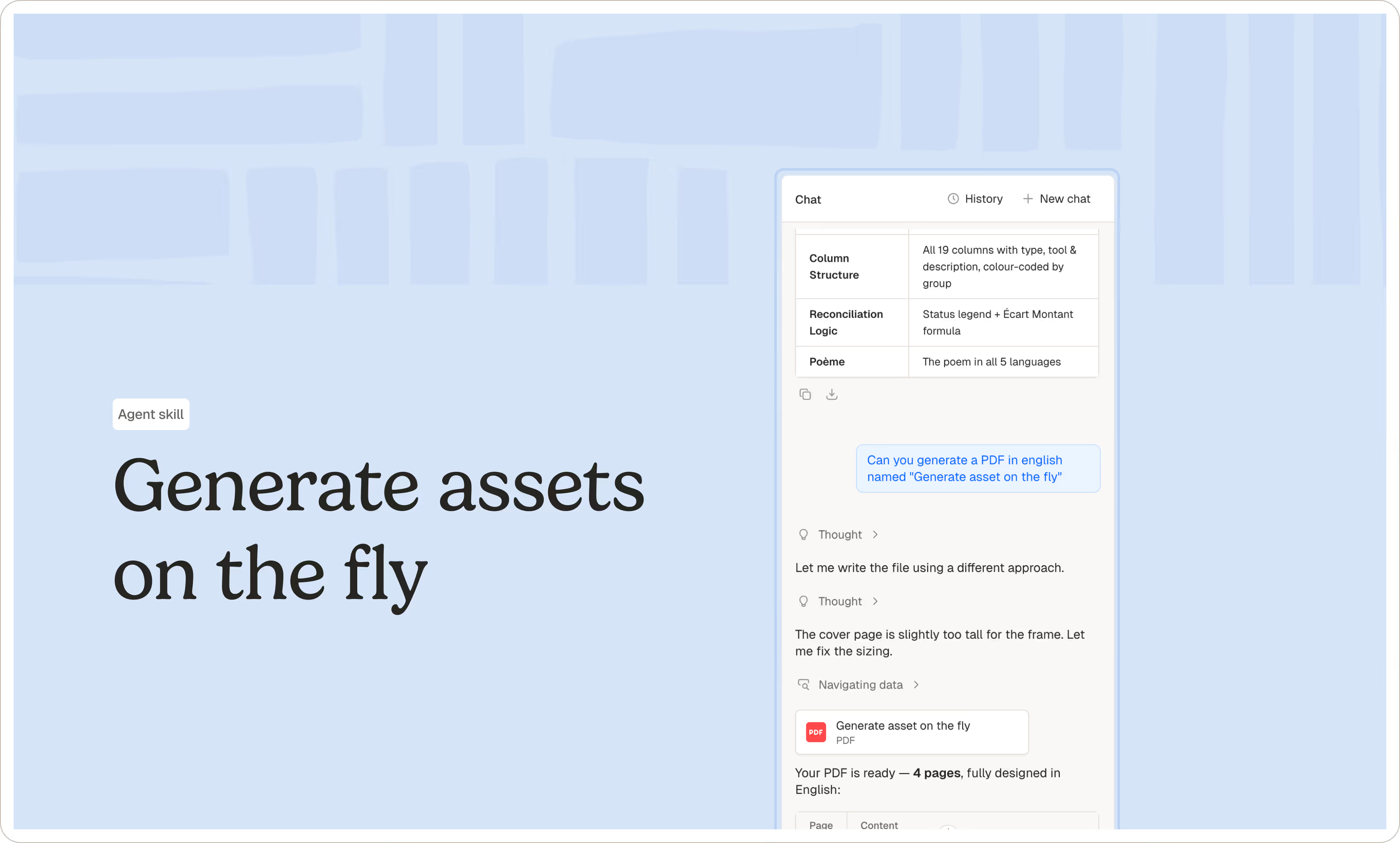
- Create assets with our agent: You can now download files our agent creates directly from the interface, such as PDFs, presentations, etc.
- Agent is always available: Our agent used to take a few moments to get ready to answer requests. Now it's always there, ready to work.
- Pin columns: Keep important columns visible while scrolling horizontally, so you never lose sight of key data.
- Change header height in table: When you toggle text wrapping, cells now resize properly to show all content.
Bug fix
- Cell statuses display accurately: All cell states—loading, error, complete—now show as expected across the board.
See you next week.
What's new in Phacet #15
This new weekly version improves the efficiency of conversation with our agent. Here's what's new:
- Agent stop button: You can now interrupt the agent mid-response. No waiting for it to finish.
- Agent clarifying questions form: Our agent can use a form to ask you questions, so you stay in the loop on ambiguous requests instead of fixing mistakes after the fact.
- Table conversation persistence: Your chat history with a table now sticks around, so you can pick up where you left off.
- Agent displaying planning: Our agent displays a to-do list when working on complex tasks, so you know what's ahead.
We hope you’ll like it! If you see anything that needs improvement we’re here.
What's new in Phacet #14
A week of smoothing out the rough edges, so the standards are elevated. Here's what's new:
- Credit estimation: You'll see estimated credit usage before running tasks, helping you plan ahead.
- Conversation deletion: You can now remove any conversation from your history.
- Phacet in French: You can set a new language preference via the settings.
- Dynamic tool naming: Our agent now uses your inputs to clearly state what actions it’s taking.
- Chat layout improvements: Text content is centered on large screens, the input field is wider, and font sizes are more consistent throughout.
Bug fixes
- File drag-and-drop fixed: Dragging files into cells works reliably again.
- Collection table deletion: Removing a collection table no longer accidentally deletes columns in the parent table.
- Citation detail view fixed: Source citations display correctly again.
See you next week.
What's new in Phacet #13
This week, we focused on making the agent smarter and more efficient. Uploading data is also smoother as it’s usually the first thing you need to do. Here's what's new:
- Agent can upload CSV: Ask the agent to import a CSV and your table fills up in seconds.
- Agent can upload PDF: Hand a PDF to the agent and it fills the content straight into your cells.
- Agent can create tables: The agent can set up an entire project, not just one table at a time. Useful for cases involving matching or reconciliation.
- Agent reasoning and actions are clearer: You can now see the agent's thinking and the detail of every action it took, making chat history easier to follow.
- Agent has help capabilities: Type "help" in chat and the agent lists everything it can do, so you never have to guess.
- Better feedback when dropping a file in chat: A new animation shows upload status when you drag and drop a file to the agent.
- File upload errors are clearer: Uploads now show helpful error states, so you know what happened and what to retry.
- Workflow graph view: A new visualization lets you trace your project workflow step by step. Currently in beta, send us a message for access.
Bug fixes
- Agent stops crashing: We fixed issues where the agent would crash and disconnect mid-conversation.
- Column resizing: The blue positioning bar no longer goes off track while dragging.
See you next week.
What's new in Phacet #12
This week, we focused on improving your experience while talking to our agent. You should be able to build more rapidly with better results and feedback. Here's what's new:
- File uploads in chat show progress: A loading indicator appears during upload, so you always know when a file is ready.
- The AI Chat is easier to read: We reworked how our agent writes with acleaner rendering, action buttons, and redesigned error cards make conversations faster to scan.
- Agent can upload files directly into cells: The agent now saves files straight into your cells.
- Action-based credits: We introduced a new way to count credit consumption that will be clearer for you. More to come in the coming weeks.
If something looks off, tell us. See you next week.
What's new in Phacet #11
This release makes your AI agent more useful day to day. Here's what's new:
- Agent behavior UI redesigned: Agent actions display in a cleaner layout to make it easier to follow what the agent is doing.
- Insight graphs from the agent: You can ask the agent to create a static chart on the spot.
- AI-generated conversation titles: Each conversation gets a clear, descriptive title so you can find past threads at a glance.
- Secure agent mode: A dedicated security layer reduces the risk of agents taking unexpected actions behind the scenes.
- Download files from table: Any file uploaded into a table can now be downloaded directly from it. Handy when the original is hard to find.
- Filters on match columns: Filter your rows to see which ones contain a match and which don't.
See you next Thursday.
What's new in Phacet #10
We're really excited about this weekly release. It brings the highly awaited agent insight, smoother table editing, and one of our most requested features: filters.
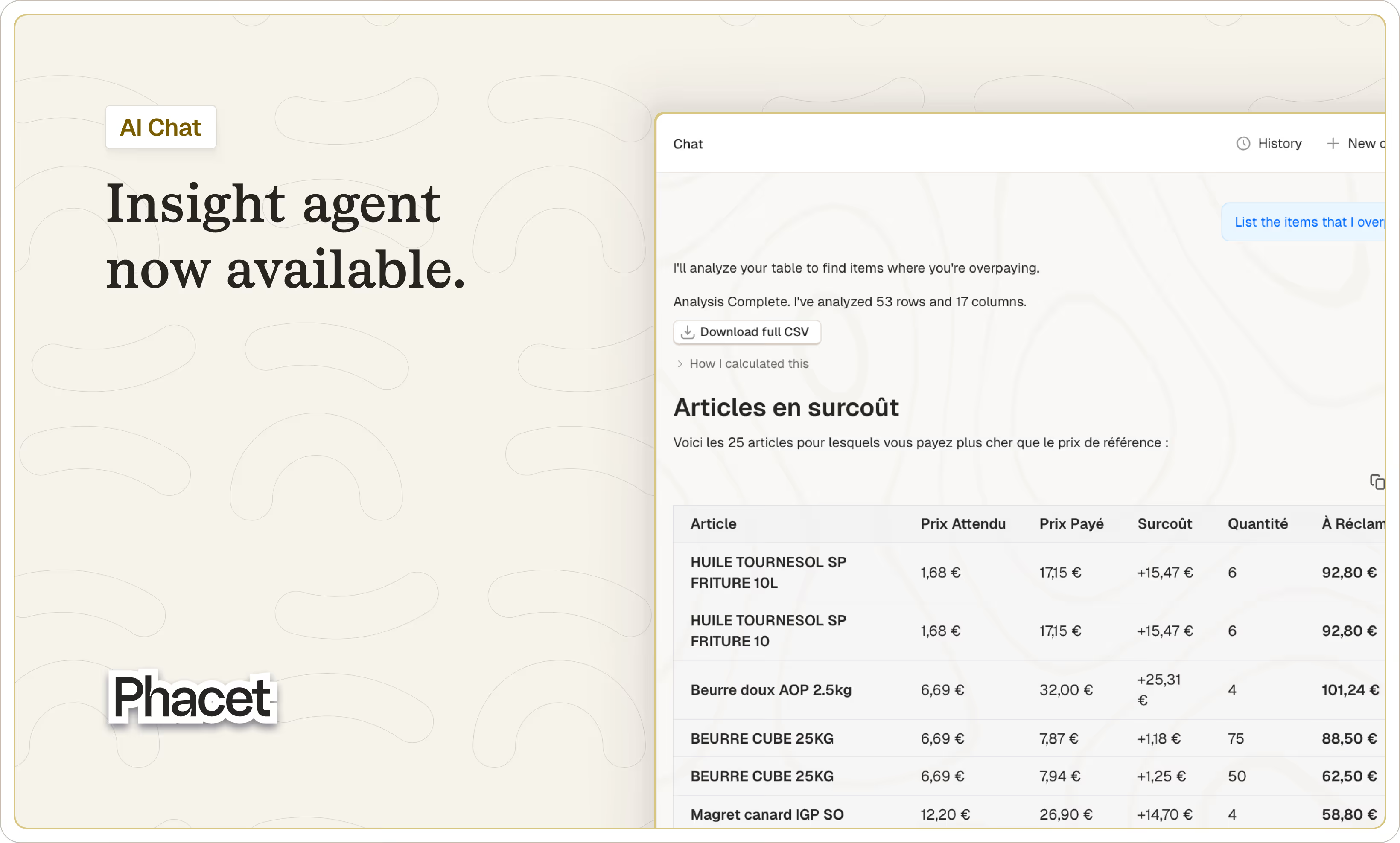
Here's what shipped:
- New insight agent: Ask our agent anything about your data and get insights in seconds.
- Filters are here: Slice long lists based on specific values to find what matters.
- Select and copy-paste table ranges: Speed up repetitive edits and data moves with familiar range selection.
- New agent manager: We added a new layer to orchestrate and monitor multiple agents in one place, laying ground for handling several tasks at once.
- More natural cell editing behavior: Replace content on keypress (like Excel) instead of appending to the end of the content.
Bug fixing:
- PDF citations: positions now calculate correctly in detail view.
- Detail view stability improvements: PDF, JSON, and AI chat widgets no longer flicker.
- CSV uploads: Now show a single loader.
This week marks an important milestone for us. You can now manage and analyze your data in one place, in seconds. We're curious to hear what you think. More improvements are on the way.
What's new in Phacet #9
The changelog and its writer took a 2 weeks holiday, but the rest of the team didn't. We spent the time making the AI work better and improving the detail view for easier reviews.
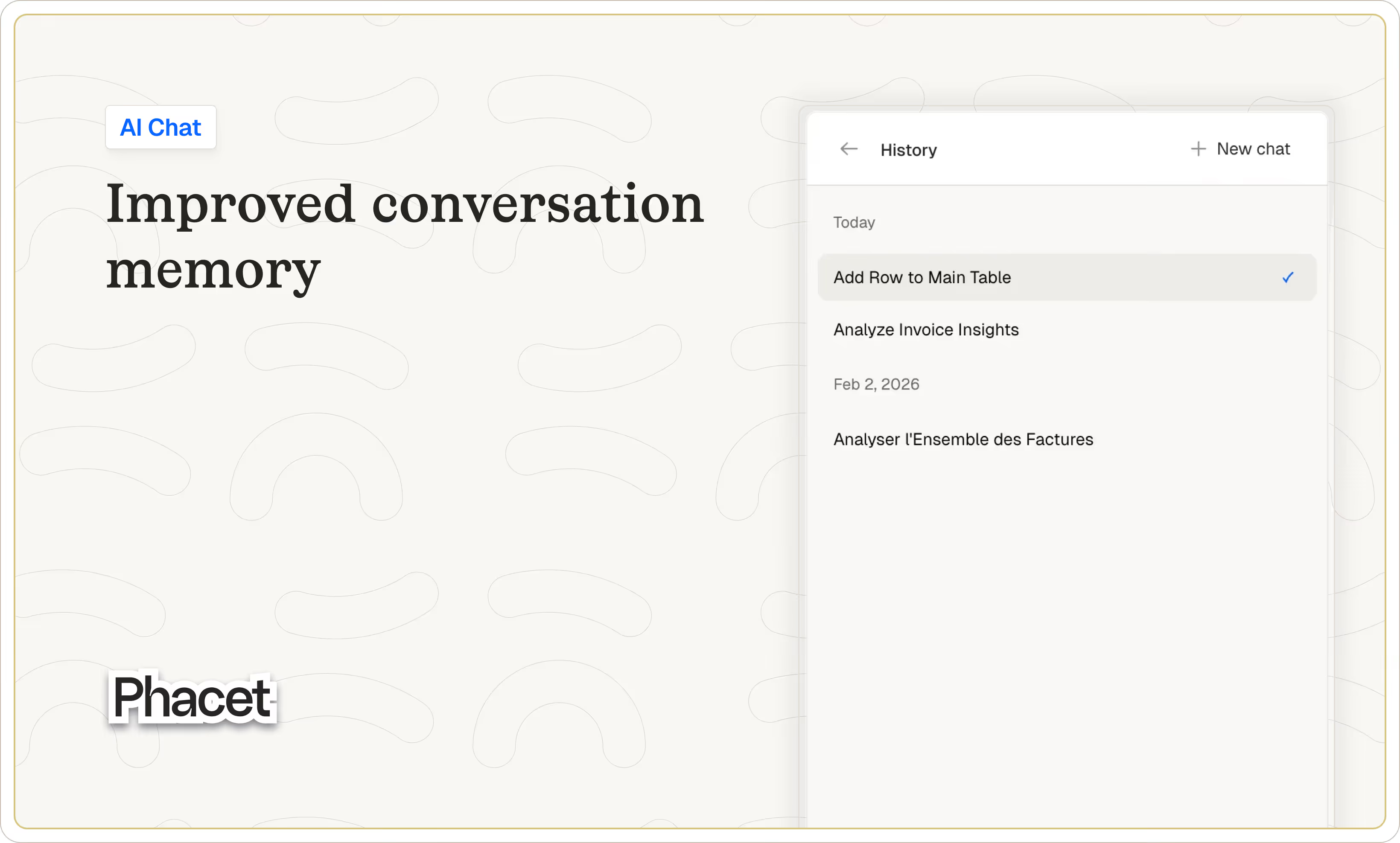
Here's what shipped:
- Chat keeps conversation context: Switching URLs no longer resets the whole conversation and context.
- Navigate between conversations: You cancreate new conversations and go back to old ones.
- New number column type: Contains numbers only, useful for quantity, amount, and other numeric data.
- Sources display in detail view: Detailed sources now show up while reviewing document (if activated).
- PDF viewer with zoom and navigation: Zoom in/out and jump to specific pages while checking PDFs.
- Detail views show row names: Rows no longer appear as "unnamed" in detail views.
- Project navigation bar slides in: Go to any section of the app right from a project with the sliding nav bar.
- Planned tooltip stays dismissed: Fixed bug where tooltip wouldn't disappear after hover.
- "See sources" hover behaves consistently: Hover states and AI source links now work reliably.
That's it for this week. Next up: improvements to the builder agent and new insight capabilities.
What's new in Phacet #8
This version of Phacet simplifies how you manage your data by allowing you to have multiple tables in one project. A staple from classic spreadsheet that makes the product easier to use. It also gives our AI more context to work with, laying ground for more complete workflows.
Here's what's new:
- Manage table within a single project: You can create, delete tables to centralize each project better and avoid back&forth.
- Simplified matching UI: Connecting data table is now more intuitive to set up.
- Security improvements: We reinforced security logics across the app to make your data safe.
That's it for this week. Next up: improvements to the builder agent and new insight capabilities.
What's new in Phacet #7
The end‑of‑year break is over. The entire Phacet team wishes you a very good year and is looking forward to what's ahead.
We didn't stay put and used this down time to cook a few elements including a whole new Detail view. This is for all of you who needed a better way to display the data and check extraction against a document or another input. We'll be releasing improvements on this view throughout the coming weeks.
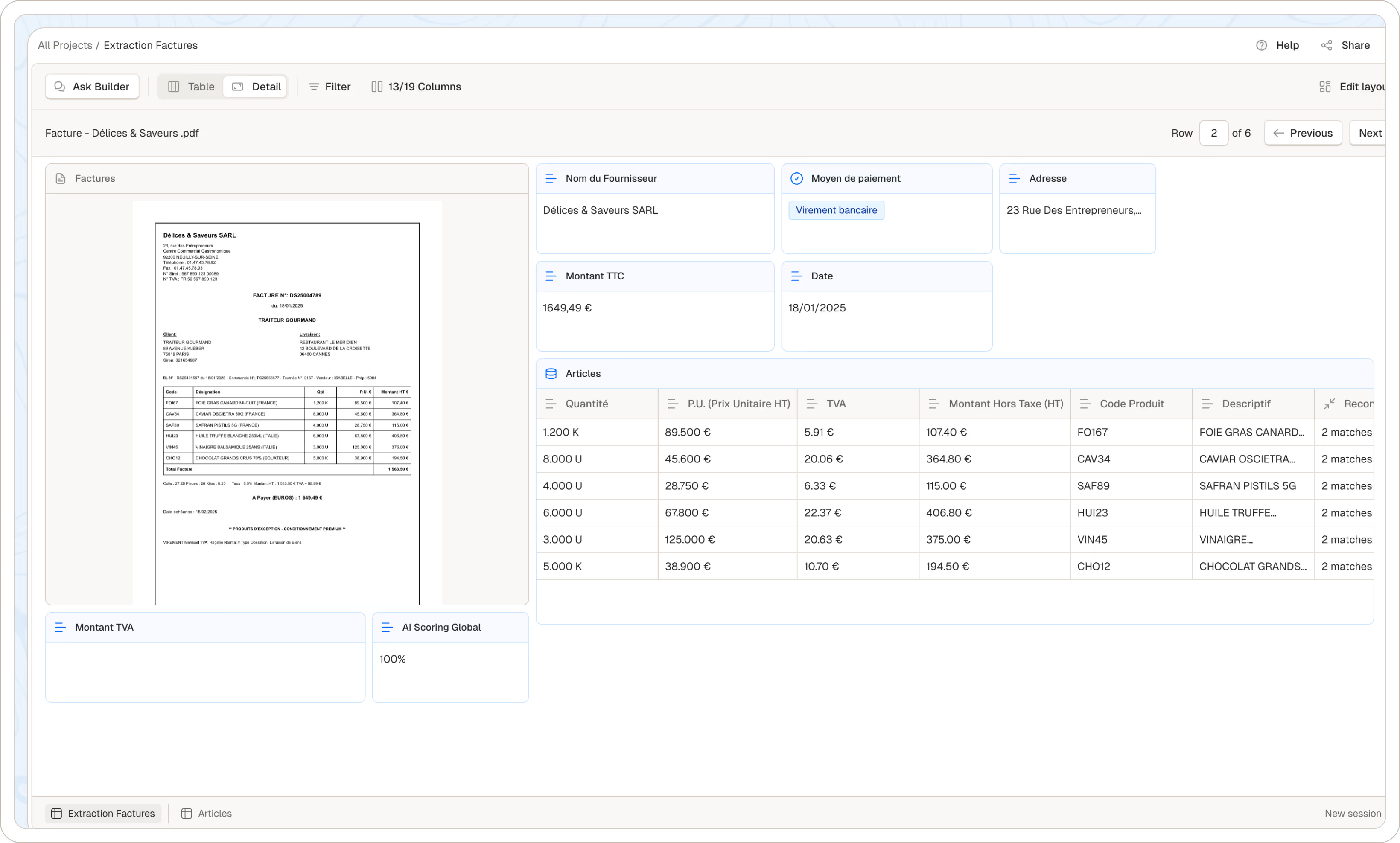
In addition, we made other improvements:
- Review work side by side: The new Detail view lets you inspect and edit what the AI extracted or generated right inside each row, comparing directly against source documents.
- New waiting status for cells: Calculations now show when a cell is blocked by another, so you understand dependencies.
- Speed and stability keep improving: We kept working on making the whole platform faster and more stable across every interaction.
- Dragging columns is clearer: The header drag interface shows exactly where a column will land before you drop it.
- Refresh at the row level: Select one or multiple rows and update their values on demand rather than a column or a cell.
We hope these features will help you start the year on a good note. We're eager for feedback on this new Detail view. Feel free to contact me at come.bohu@phacetlabs.com.
What's new in Phacet #6
This week, we've been focusing on performance. New clients mean pushing the boundaries of what's possible. You'll soon notice a big boost for AI and Python functions. In the meantime, we're also making it easier to trigger workflows at the cell level, so it's faster for you and more cost-efficient.
Here's what's new:
- Columns order is the same for everyone: The table opens exactly how you all want it to be.
- Chat panel resizes smoothly: Need more space? Drag the chat panel for more comfort.
- Run AI cells from anywhere: Right-click opens a focused menu to execute AI cells. Useful for testing and iterating.
- Pages load smarter: The navigation stays responsive even with many features.
- Text updates is quicker: We fixed the latency when editing a cell.
- Large JSON have less performance impact: Long JSON data now truncates when too big (more than 20 lines), keeping tables fast.
- Backend technical improvements: You should have fewer hiccups when you're deep in complex work.
This was a week with a lot of behind the scene work. If you thing that the platform still feels slow, ping us and we'll see what we can do.
What's new in Phacet #5
For this new release, we focused on making the experience faster. We're tuning performance through the end of the year, as some of you may have encountered slowdowns in the past few days.
- We added quickstarters to our Agent Builder: A new empty state surfaces actions, so you're never staring at a blank page.
- Large data stays efficient: JSON cells are displayed as a preview when they are too large for the row. This makes rendering, scrolling and loading feel instant.
- Speed improvements across the board: We've streamlined rendering, tightened memory use, and optimized data handling across the app. We'll keep sharpening speed through Christmas.
- Invoice processing is more efficient: We now use a small, fast model for invoice vectors so uploads keep pace without lag.
- Clearer error messages: We surface more detailed errors so issues point to the right file types and formats.
We appreciate you being here as we keep making Phacet better. Don't hesitate to reach out.
What's new in Phacet #4
This week we partnered with Linkup and ElevenLabs during a 1-day hackathon. Linkup brings best-in-class web search at a lower credit cost. ElevenLabs lets you prompt with voice, so you can add context faster. We'll keep building deeper integrations with both.
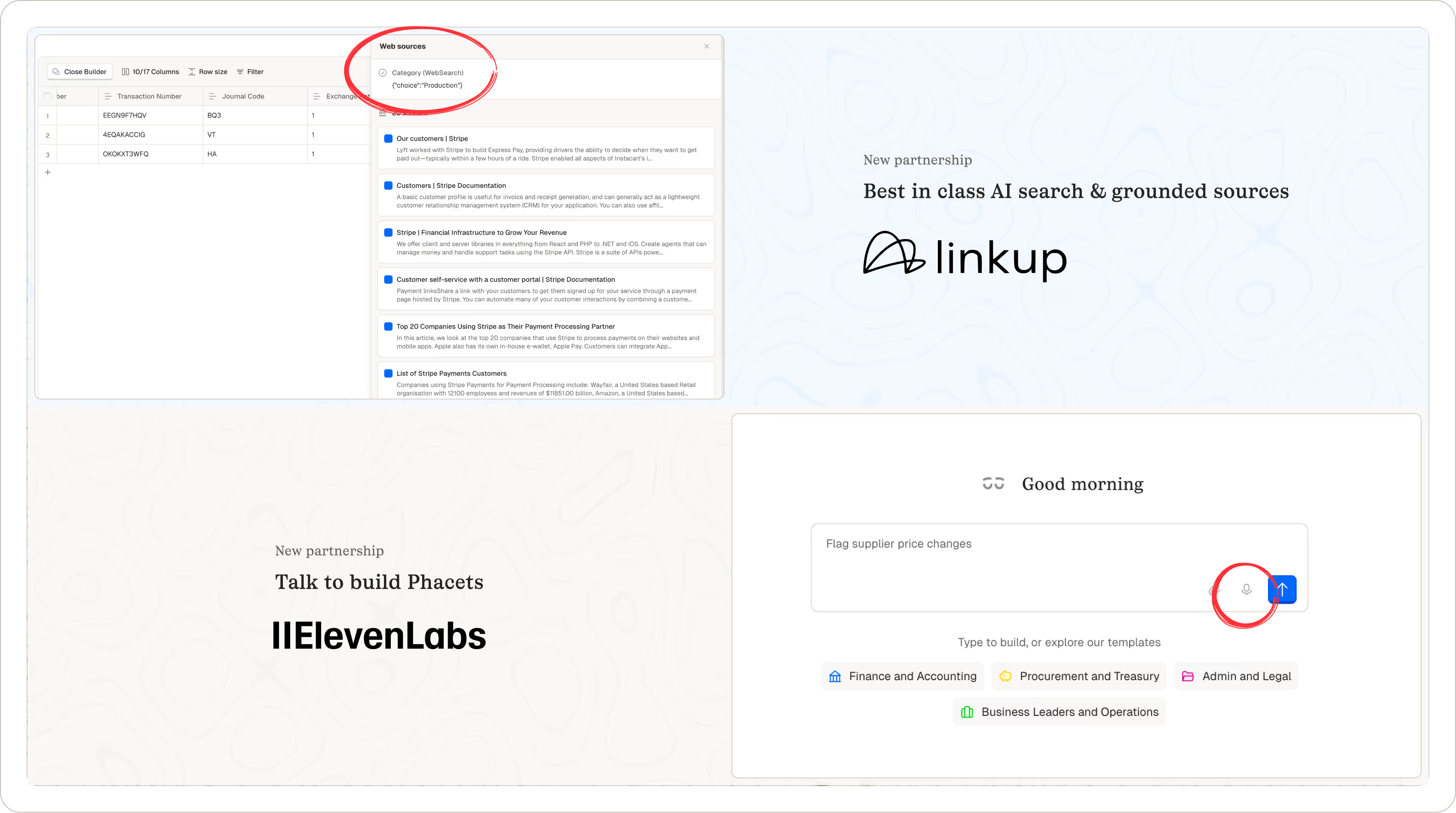
Here's what's new:
- Search shows its sources: Linkup results now include citations, so you can see where information comes from - just like when extracting data from files.
- Prompt hands-free with voice: Speech-to-text in the Agent Builder lets you iterate faster without stopping to type.
- API uploads work across systems: File names adapt automatically to prevent errors, so integrations stay smooth.
- Row selection feels right again: Hover now covers the full row, making it easier to scan and select what you need.
- Members control their columns: Sort, hide, and update values is available for all roles.
- Orange joins your color palette: One more option to organize and visually separate your work the way you like.
Thanks for being here and using Phacet. If something looks off, tell us. your feedback helps us improve the product every week.
What's new in Phacet #3
This Phacet release keeps your collection tabs in sync. We added a ton of small improvements to make your life easier. Here’s what’s new:
- Collections stay in sync automatically: When adding AI capabilities to a collection, any changes from the main table flow up instantly. This will run as you add or edit rows - no need to visit the collection tab and update columns manually.
- Builder agent stays responsive: the input stays enabled while the assistant streams, so you can keep typing and steer the reply.
- Document errors show clearly: Loading issues surface with a visible message and a retry button for quick recovery.
- Table preferences stay put: Saved row heights hold across collections and tabs to reduce layout jumps.
- Edit select type faster with keys: Selection and navigation in Select got fixed, you can edit quicker without the mouse.
- Matching got an upgrade: you can now match elements within the same Phacet. This hekps surface duplicates to tidy data.
- Core behavior is steadier: Analytics, logging, permissions, templates, and error handling are sharper to reduce flaky moments.
Thanks for being here and using Phacet. If something looks off, tell us. Your feedback matters.
What's new in Phacet #2
This new version of Phacet welcomes a new page. It boosts stability, clarity, and speed across the app with our weekly batch of improvements and fixes. Here’s what happened this week:
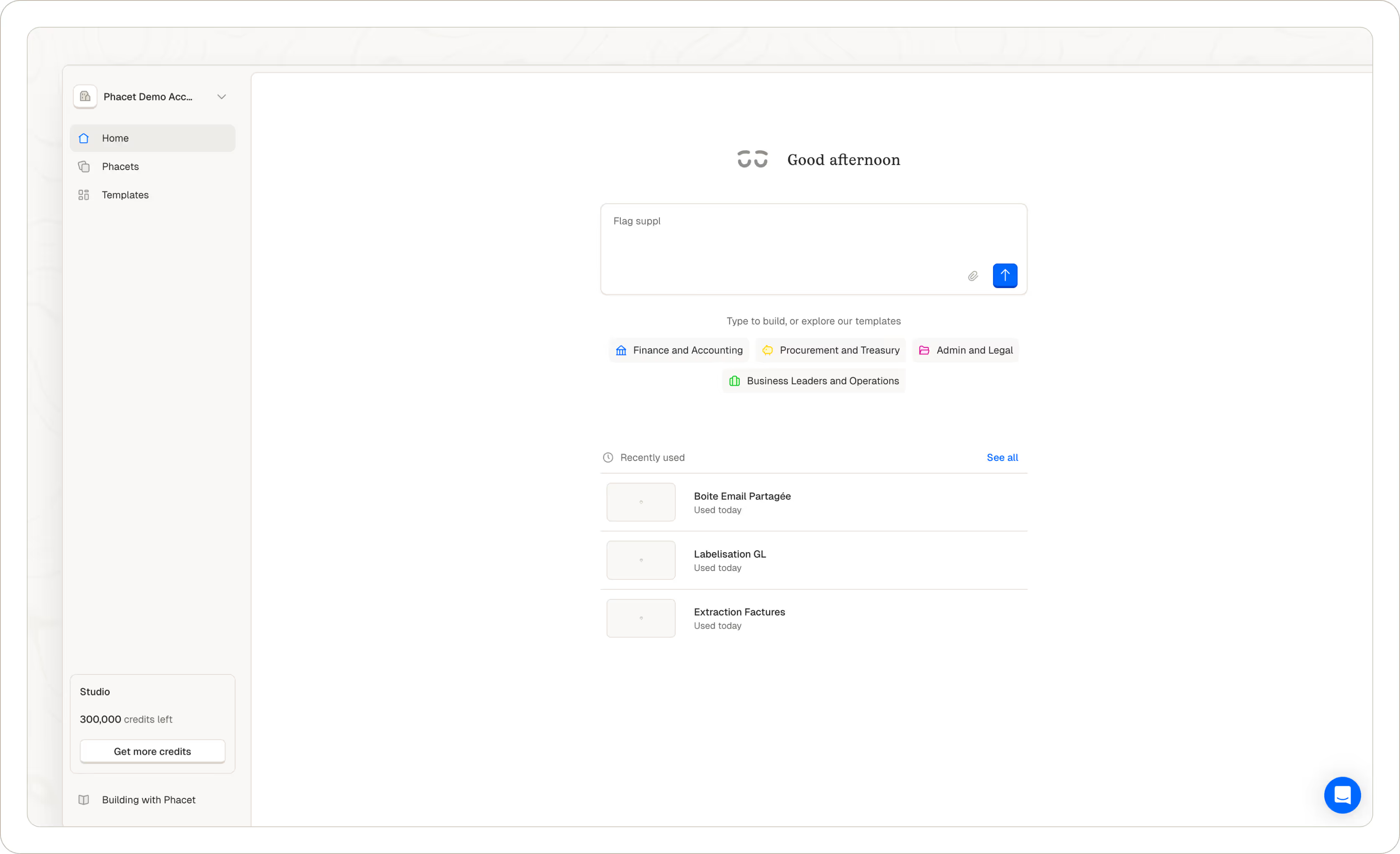
We reached a SaaS milestone with the release of our Home page
- We have a new home page. This is meant to be your entry point for building and accessing phacet.
- This is currently an - almost - empty input. Yet another one. We’ll improve this in the coming weeks to help you build what you really need. In the meantime, you can access templates to get a shot of inspiration.
In other news
- Stay oriented automatically: Backlinks on phacets appear on their own, keeping you anchored as you move.
- Text edits fit the cell: The TextEditor adjusts to the cell height and autogrows, so content stays readable.
- Ingest files faster: we added an upload by URL to the public API to reduces steps when sending files.
- Core behavior is sharper: Column creation wording is clearer; small copy fixes tidy things up.
Bug fixing
- Keep actions reachable: The “Add row” button sticks on the left while you scroll horizontally.
- Match triggers behave reliably: The column now fires as expected, removing a hidden blocker that made you laumch multiple times the matching.
- Nasty tooltip fixed: The “last edit” tooltip shows correctly on the first line.
If something looks off, tell us. Your feedback helps us sharpen the experience. Shoot me an email come.bohu@phacetlabs.com
What's new in Phacet #1
We’re introducing a new Template page to help you kickstart a Phacet with preset AI, Python or websearch skills. With templates, creating a Phacet takes minutes. Bonus, we added some disco balls.
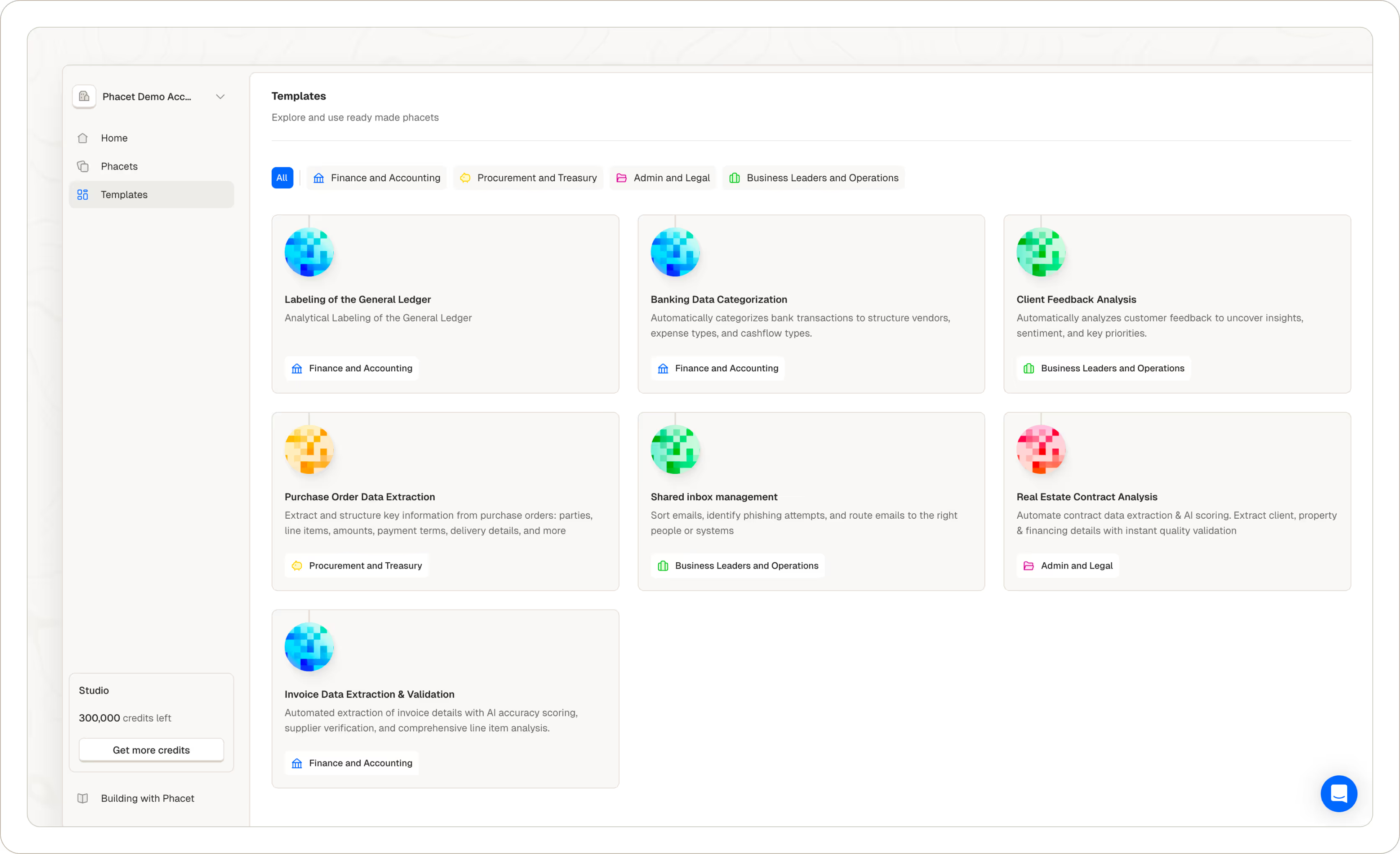
Why it matters
- Inspiration: see what’s possible with ready-made patterns for common financial workflows.
- Clarity: understand how we build a phacet by example. Learning by copying.
- Speed: reduce time to value with opinionated defaults that just work (ours).
How it works
- Pick a template that matches your goal.
- Launch with preconfigured columns.
- Swap in your data, adjust steps as needed - via the agent builder or in the column settings.
As someone famously said inside Phacet, “Start from a template. Then make it yours.”
In other news:
- We’ve added multi‑organization support, so people can switch between companies. Perfect for partners onboarding multiple clients to Phacet - one login, fast context switching. This feature is for Romain from CPA.
Thanks for reading this first release note. We release new updates weekly. Stay tuned. If you have any feedback, feel free to reach out to me come.bohu@phacetlabs.com